Claude Code on WSL
Distinguishable Windows Terminal tabs
Claude Code and Codex can overwrite the Windows Terminal tab title, leaving several WSL tabs hard to tell apart. This optional zsh setup makes the shell the single title owner:
~ · >_ Codex
~ · ✳ Claude
text2sql-agent · >_ Codex
text2sql-agent · ✳ Claude
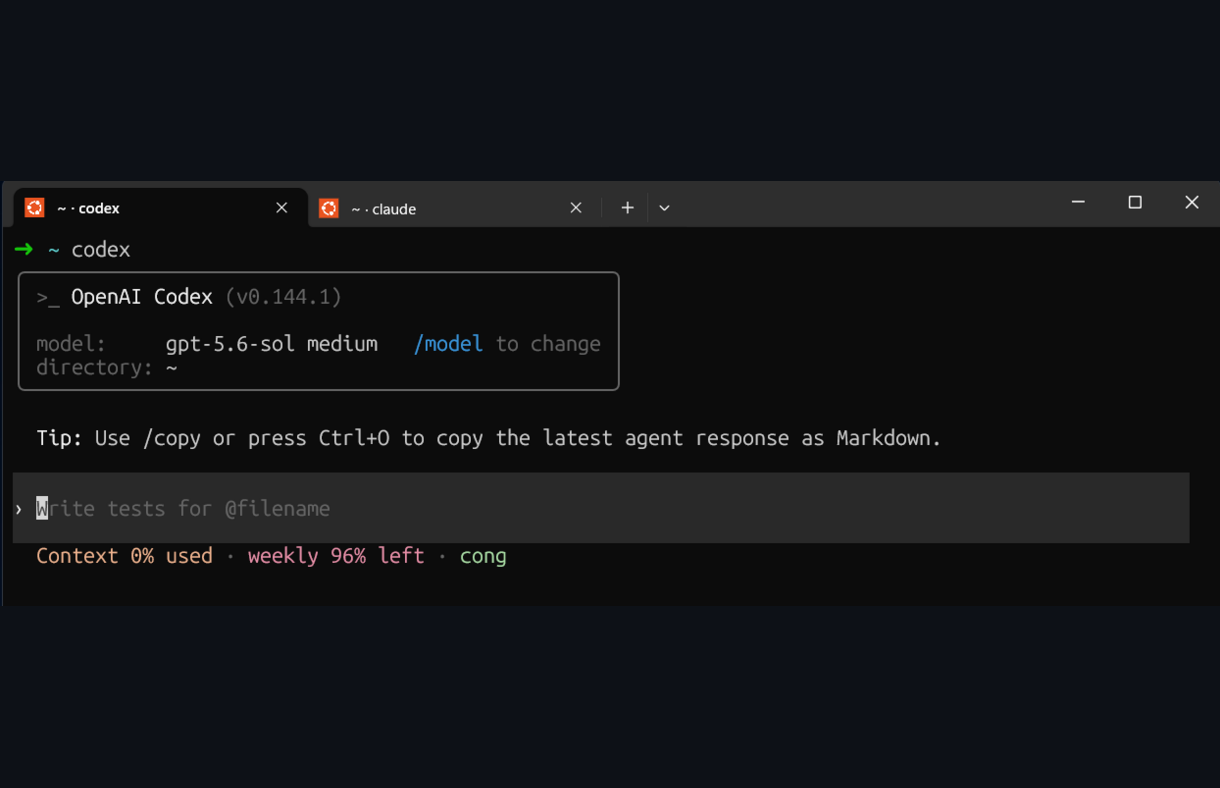
The current directory and active agent stay visible in the tab bar.
This page targets Windows Terminal + WSL2 + zsh. Ubuntu uses bash by default, so do
not paste the zsh hooks below into ~/.bashrc.
1. Allow applications to update the Ubuntu tab title
Open the Ubuntu profile in Windows Terminal settings and make sure Suppress application
title is disabled. The equivalent profile setting in settings.json is:
"suppressApplicationTitle": false
Open a new Ubuntu tab after changing this setting. Existing tabs may keep their old title.
2. Let zsh own the title
Add this to ~/.zshrc:
# Claude Code otherwise replaces the shell-managed title with "Claude Code".
export CLAUDE_CODE_DISABLE_TERMINAL_TITLE=1

autoload -Uz add-zsh-hook

_wt_project_name() {
  local root
  root=$(git rev-parse --show-toplevel 2>/dev/null)

  if [[ -n "$root" ]]; then
    print -r -- "${root:t}"
  elif [[ "$PWD" == "$HOME" ]]; then
    print -r -- "~"
  else
    print -r -- "${PWD:t}"
  fi
}

_wt_set_title() {
  local title="$1"
  title=${title//[[:cntrl:]]/}
  printf '%s' $'\e]0;'"$title"$'\a'
}

_wt_title_idle() {
  local project=$(_wt_project_name)
  _wt_set_title "$project"
}

_wt_title_running() {
  local project=$(_wt_project_name)
  local command_name="${1%% *}"
  local command_label="$command_name"

  case "$command_name" in
    codex) command_label=">_ Codex" ;;
    claude) command_label="✳ Claude" ;;
  esac

  _wt_set_title "${project} · ${command_label}"
}

add-zsh-hook precmd _wt_title_idle
add-zsh-hook preexec _wt_title_running
Reload zsh:
exec zsh
When no command is running, the tab shows the Git repository name or current directory. While a command runs, its executable name is appended.
3. Stop Codex from replacing the zsh title
If Codex is installed, set an empty terminal title list in ~/.codex/config.toml:
[tui]
terminal_title = []
Merge this into an existing [tui] table rather than creating a duplicate table. For
Codex completion balloons, see codex-notify.
Verify
First confirm that Windows Terminal accepts title updates:
printf '\e]0;TEST-TITLE\a'
The zsh prompt immediately replaces TEST-TITLE with the current directory title; that is
expected and proves both layers are working. Then test each agent from the same project:
cd ~/code/text2sql-agent
codex
# Exit Codex, then:
claude
The tabs should show text2sql-agent · >_ Codex and text2sql-agent · ✳ Claude
respectively. >_ matches Codex’s own terminal header; ✳ matches the Claude Code tab
mark. Other commands continue to use their executable name without a special symbol.
Troubleshooting
- The tab stays
Ubuntu: open a new tab and rechecksuppressApplicationTitle. - The tab becomes
Claude Code: confirmCLAUDE_CODE_DISABLE_TERMINAL_TITLE=1is present in a fresh interactive shell. - Codex reports
invalid float, expected nan: TOML has nonullliteral; useterminal_title = []exactly. - The title changes only after an app exits: restart that app after reloading zsh.