Claude Code on WSL
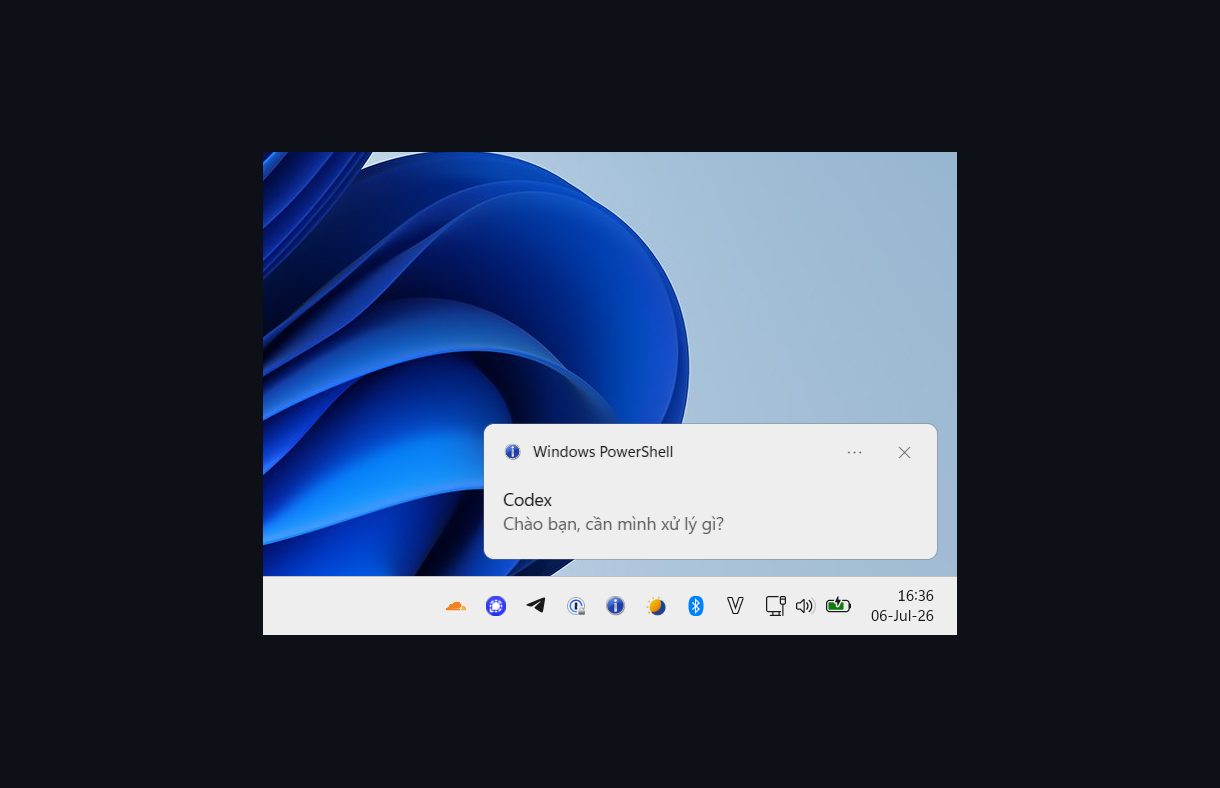
Codex CLI WSL2 — “Done” Windows Notification
Problem
When Codex CLI finishes a turn on WSL2, the terminal gives no visual signal that it is done — you only notice if you switch back to the terminal yourself.
This is the Codex variant of the notification fix. It reuses the same
~/bin/claude-notify script as the Claude Code WSL2 setup (see claude-notify), but
wires it up through Codex’s notify config instead of Claude hooks.
Trap:
[tui].notifications = trueis not this. That setting only controls the in-terminal (escape-code) notification and never runs an external program. The Windows balloon needs the separate top-levelnotifykey — missing it means Codex never fires the balloon even with[tui].notifications = trueenabled.
How It Works
- Codex finishes a turn and emits an
agent-turn-completeevent. - It runs the program in the top-level
notifykey, passing the event JSON as the final argument. With["bash", "-c", "<script>", "--"], the"--"becomes$0and the JSON lands in$1. jqextractslast-assistant-messagefrom the payload, so the balloon shows Codex’s actual last reply (truncated to 120 characters via jq’s.[0:120]slice — nothead -c, which cuts bytes and can shred a multibyte UTF-8 char into mojibake), falling back to"Done!"if parsing fails.~/bin/claude-notify "Codex" "<msg>"runs with a trailing&so it detaches immediately — Codex never blocks while the balloon is up. The reply is model output, so the script hands it to PowerShell base64-encoded: quotes in the reply cannot end a PowerShell string or run commands.- The script’s
GetForegroundWindow()check still applies: the balloon is suppressed when Windows Terminal is the active window, so it only appears when you’ve stepped away.
Setup
Prerequisite: the notify script and jq
This reuses ~/bin/claude-notify from claude-notify — install that first if you
haven’t. Also install jq:
sudo apt install jq
Add the notify key
Add to the top-level section of ~/.codex/config.toml (before any [table] header —
TOML requires top-level keys to precede tables):
notify = ["bash", "-c", "msg=$(printf '%s' \"$1\" | jq -r '(.\"last-assistant-message\" // \"Done!\") | .[0:120]' 2>/dev/null); ~/bin/claude-notify \"Codex\" \"${msg:-Done!}\" &", "--"]
Restart Codex for the config to take effect.
Result
When Windows Terminal is not the active window, a balloon tip appears in the system
tray titled Codex with Codex’s last reply as the body. Clicking it restores and
focuses Windows Terminal (handled by ~/bin/claude-notify). No notification fires if you
are already looking at the terminal.
Troubleshooting
No balloon appears
- Confirm the
notifykey is at the top level ofconfig.toml, not inside a[table]. A misplaced key is silently ignored or causes a TOML parse error. - Verify the script works standalone:
~/bin/claude-notify "Codex" "test"(switch away from Windows Terminal first, or it will self-suppress). - Confirm
jqis installed:command -v jq. - Restart Codex — it only reads
config.tomlat startup.
Balloon appears for some replies but not for others
- Older copies of
~/bin/claude-notifyput the reply inside a single-quoted PowerShell string. An apostrophe could end that string:'in the oldest copies, and the typographic’(which PowerShell also treats as a quote) in later ones. A crafted reply could also run PowerShell commands. Reinstall the script from claude-notify; the current version passes text base64-encoded.bash scripts/doctor.shflags an older copy.
Balloon shows raw JSON instead of the reply
- The
jqfilter failed (older Codex payload, orjqmissing). The script falls back to"Done!", not raw JSON, so a JSON body means an older/hand-rollednotifyline — use the exact line above.
[tui].notifications = true is set but nothing happens
- That setting is unrelated — it only does in-terminal notifications. Add the top-level
notifykey as shown above.
Verify and remove
Switch away from Windows Terminal and let Codex finish a turn. The balloon should show
the start of the reply; a reply containing ’ also confirms an up-to-date script.
To remove, delete only the top-level notify entry you added and restart Codex. Keep
~/bin/claude-notify while Claude Code hooks or tmux-notify-run still use it.